Gemini para fabricar láminas de colorear: así se evita una hoja llena de sombras
Con instrucciones precisas, la inteligencia artificial puede generar dibujos simples para imprimir, sin diseño previo ni suscripción paga.
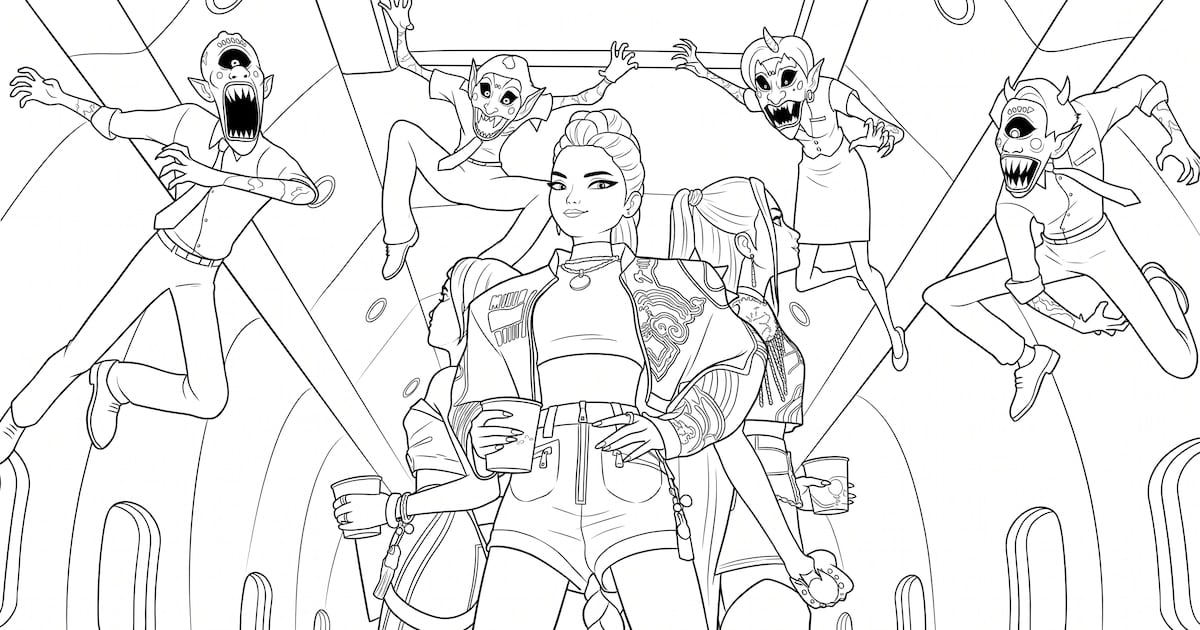
Imprimí una supposedly activity, abrí la impresora y descubriste que el supposedly personaje k-pop tenía una sombra inexplicable. Sí, la tecnología también puede arruinar una tarde de coloreado. Gemini, accessed from the browser or the mobile app with a Google account, solves this by converting natural-language instructions into black-and-white illustrations ready to download and print.
The key is not to expect a miracle with a single vague sentence. Before writing the prompt, decide what should appear on the sheet. A scene with three characters in a group pose and a simple background of musical symbols usually works better for small children, because it leaves broad areas to paint.
A prompt that leaves little room for interpretation
The instructions should be explicit. Phrases such as "black-and-white drawing", "thick and clean lines", "no color", "no shadows", "no gradients" and "ample spaces to paint" guide the result toward a usable coloring page. It is also useful to request an animated-style illustration instead of a realistic image. For younger children, ask for broad strokes and rounded figures.
- Specify the characters or scene before generating the image.
- Request thick, clean black lines and broad areas to paint.
- Include the paper format and orientation in the prompt.
- If the first result includes color or a busy background, correct it in the same chat.
- Before printing, check that the outlines are sharp, the text does not overlap and no figure is cut off.
The paper format is part of the prompt, not an afterthought. Requesting a vertical composition for A4 printing or a letter-sized sheet prevents characters from being clipped at the edges. Orientation depends on the scene: three aligned figures work better in landscape, while one central character surrounded by elements can work in portrait.
If Gemini adds color or fills the background, the first result can be corrected in the same conversation. A specific instruction such as asking to remove the background and turn the image into a coloring page with black lines is usually more effective than starting over.
Once the desired result appears, the download option is displayed next to the image. In the web version, the file is saved at full size; in the app, it remains in the device gallery. Before printing, it is worth checking the contours, any overlapping text and whether any part of the illustration is cropped.
Used a generative AI tool to prepare paper activities? Tell us how it went. And do not throw the printer out yet: check the margins first.
Comentarios
0Todavía no hay comentarios. Sé el primero.
Seguí leyendo
Solitario, Buscaminas y compañía: la mudanza que dejó a Windows sin sus juegos de cabecera